How do I set up my email address in Apple Mail?
Print- apple mail, Email
- 1
If you haven't created an email address yet, this is explained in the article How to create an email address?.
If you have already created an email address, you will need the credentials sheet you received via email to set up the address in Apple Mail. The information in the "Email Settings" section is important.
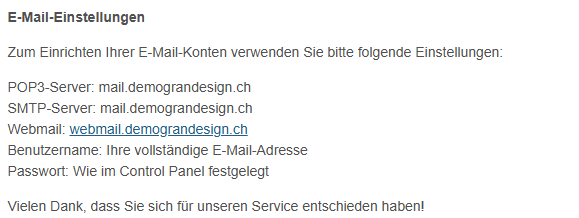
Set up Mail:
- Open your Apple Mail application.
- In the top menu bar, click on "Mail".
- Select "Add Account".
- Choose "Other Mail Account" and click "Continue".
- Enter your name, email address, and password.
- In the next step, enter your username (username = email address).
Account Type: IMAP
Incoming Mail Server: as per credentials sheet (POP3 Server)
Outgoing Mail Server: as per credentials sheet (SMTP Server) - Click "Sign In".
- Go back to the "Mail" menu and select "Preferences".
- Select your mailbox and open the "Server Settings" tab.
- Uncheck "Automatically manage connection settings" for the Incoming Mail Server (IMAP).
Enter port 993 or the port indicated in your credentials sheet. Check "Use TLS/SSL". - Click "Advanced IMAP Settings" and ensure "INBOX" is set as the IMAP Path Prefix.
- Uncheck "Automatically manage connection settings" for the Outgoing Mail Server (SMTP).
- Enter port 465 or the port indicated in your credentials sheet. Check "Use TLS/SSL".
- Click "Save" to finalize the setup.
Your email account is now set up in Apple Mail.


