Wie erstelle ich ein neues Projekt?
Drucken- Website Erstellen, Grandesigner, Creator, Projekt
- 2
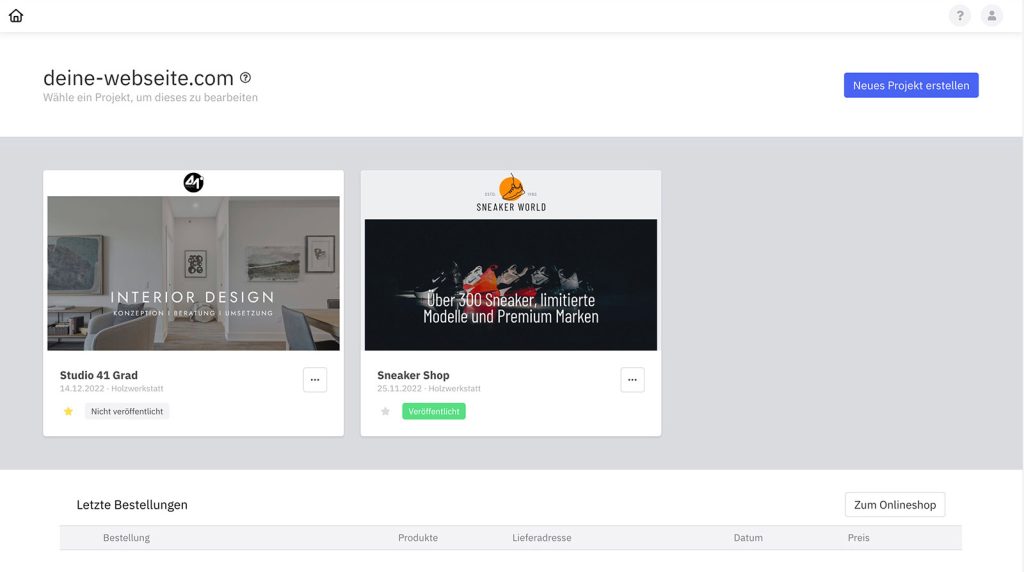
Neues Projekt erstellen
Damit du überhaupt starten kannst, musst zu zuerst ein Projekt erstellen.
- Klicke auf der Startseite auf „Neues Projekt erstellen“.
- Wähle einen passenden Projektnamen und bestätige.
- Du wirst automatisch zur Seite der Designs weitergeleitet, um eine Vorlage zu wählen.
Den Namen kannst du nachher jederzeit über die Projekt-Einstellungen ändern.
Mehrere Projekte
Lege so viele Projekte an, wie du möchtest. Die Anzahl ist unbegrenzt. Mehrere Projekte können Sinn ergeben, wenn du größere Änderungen an der Webseite vornehmen möchtest, dies aber nicht innerhalb des Hauptprojekts geschehen soll oder du einen kompletten Relaunch deiner Seite mit neuem Design planst.
Es kann jeweils nur ein Projekt veröffentlicht sein. Veröffentlichst du ein zweites Projekt, werden die Website-Daten des ersten Projektes auf dem Server überschrieben und das zweite Projekt auf „Nicht veröffentlicht“ gesetzt. Das Projekt bleibt weiterhin bearbeitbar und wird nicht gelöscht.